
Your Playwright signup test clicks “Send code,” waits ten seconds, and opens an inbox. It passes locally. In CI, the same test sometimes finds nothing—or reads a code from another run.
For an email OTP test, wait for the message belonging to this test, then submit its code in the browser. This recipe creates a fresh inbox, uses an explicit cursor so an early arrival is still visible, and separates an arrival timeout from a missing-code failure.
You will get a complete TypeScript test to adapt to your staging application. It uses MailHulk’s receive-only API; your application and its email provider still send the message.
What should a Playwright OTP email test prove?
A passing journey should prove that the application sent an email to the test’s address, the expected message contained a usable OTP, and entering that received OTP completed verification. An assertion that an email exists stops before the user’s outcome.
Keep this boundary focused. Use mocks or internal test hooks for most validation and state-transition checks. Exercise real email reception for a small set of critical signup or login journeys. If a local SMTP catcher already covers your intended boundary, you can use the same isolation-and-wait pattern there.
This recipe does not measure inbox placement, test rendering across email clients, or cover OTP expiry and replay. Those need separate checks. For the framework-independent pattern, read how to test OTP emails without flaky waits.
Set up the application and test configuration
Use a staging application that can send to a generated test address, a project-scoped MailHulk API key, and a Playwright TypeScript project. Store the key in your CI secret store. Resolve it in the test process; keep it out of browser code. For a new project, follow the official Playwright installation guide:
npm init playwright@latest
npx playwright install chromium
Set these environment variables in your local shell or CI configuration:
APP_URL: your staging application origin, such ashttps://staging.example.com.MAILHULK_URL: the API origin, such ashttps://mailhulk.net, without/v1.MAILHULK_API_KEY: a key scoped to the test project and environment.OTP_SUBJECT: the exact subject your application sends, such asYour verification code.
Use HTTPS for remote origins. Adapt the /signup path, field labels, button labels, success heading, and six-digit format below to your application. This example assumes signup sends exactly one OTP email to a new address; it deliberately fails if a different message arrives first.
For this OTP project in playwright.config.ts, disable automatic recordings. A browser trace or screenshot can capture the code even when you never print it:
import { defineConfig } from '@playwright/test';

export default defineConfig({
  use: {
    trace: 'off',
    screenshot: 'off',
    video: 'off',
  },
});
If your configuration has per-project recording overrides, apply these settings to the project running this test. The sample attaches a small diagnostic record instead. Keep that record private too: it contains an internal inbox identifier.
Copy the complete OTP test
Save this as tests/email-otp.spec.ts. Playwright’s standalone request context keeps the MailHulk credential separate from the application’s browser context.
import { randomUUID } from 'node:crypto';
import { test, expect, request } from '@playwright/test';

function required(name: string): string {
  const value = process.env[name];
  if (!value) throw new Error(`Set ${name} before running this test`);
  return value;
}

test('signup accepts the received OTP', async ({ page }, testInfo) => {
  test.setTimeout(120_000);
  page.setDefaultTimeout(10_000);
  page.setDefaultNavigationTimeout(10_000);

  const appUrl = required('APP_URL');
  const subject = required('OTP_SUBJECT');
  const mail = await request.newContext({
    baseURL: required('MAILHULK_URL'),
    extraHTTPHeaders: {
      Authorization: `Bearer ${required('MAILHULK_API_KEY')}`,
    },
    timeout: 10_000,
    maxRedirects: 0,
  });
  const baseline = '00000000000000000000000000';
  let inboxId: string | undefined;
  let failed = false;
  const diagnostic: Record<string, unknown> = {
    phase: 'create', baseline, retry: testInfo.retry,
  };

  try {
    const created = await mail.post('/v1/inboxes', {
      headers: { 'Idempotency-Key': randomUUID() },
      data: { name: 'playwright-otp', ttl_seconds: 900 },
    });
    if (created.status() !== 201) {
      throw new Error(`Inbox creation failed: HTTP ${created.status()}`);
    }
    const { data: inbox } = await created.json();
    inboxId = inbox.id;
    diagnostic.inboxId = inboxId;
    diagnostic.phase = 'trigger';

    await page.goto(new URL('/signup', appUrl).href);
    await page.getByLabel('Email', { exact: true }).fill(inbox.address);
    diagnostic.triggeredAt = new Date().toISOString();
    await page.getByRole('button', {
      name: 'Send code', exact: true,
    }).click();

    diagnostic.phase = 'wait';
    const latest = `/v1/inboxes/${inboxId}/messages/latest`;
    const received = await mail.get(latest, {
      params: { wait: 60, after: baseline, view: 'summary' },
      timeout: 65_000,
    });
    const status = received.status();
    const degraded = received.headers()['x-mailhulk-wait-degraded'];
    diagnostic.httpStatus = status;
    diagnostic.requestId = received.headers()['x-request-id'];
    diagnostic.degraded = degraded ?? null;
    if (status === 204) {
      throw new Error(degraded
        ? 'Email wait skipped because wait capacity was reached'
        : 'No email arrived after the baseline within the 60-second wait');
    }
    if (status !== 200) {
      throw new Error(`Email lookup failed: HTTP ${status}`);
    }

    const { data: message } = await received.json();
    diagnostic.phase = 'extract';
    diagnostic.messageId = message.id;
    diagnostic.receivedAt = message.received_at;
    diagnostic.subjectMatches = message.subject === subject;
    diagnostic.codeCount = message.codes.length;
    if (message.subject !== subject) {
      throw new Error('Unexpected email subject');
    }
    if (message.codes.length !== 1 || !/^\d{6}$/.test(message.codes[0])) {
      throw new Error('Expected exactly one six-digit OTP in the email');
    }

    diagnostic.phase = 'verify';
    await page.getByLabel('Verification code', {
      exact: true,
    }).fill(message.codes[0]);
    await page.getByRole('button', { name: 'Verify', exact: true }).click();
    await expect(page.getByRole('heading', {
      name: 'Email verified', exact: true,
    })).toBeVisible({ timeout: 10_000 });
  } catch (error) {
    failed = true;
    await testInfo.attach('email-diagnostic', {
      body: JSON.stringify(diagnostic, null, 2),
      contentType: 'application/json',
    });
    throw error;
  } finally {
    try {
      if (inboxId) {
        const removed = await mail.delete(`/v1/inboxes/${inboxId}`);
        if (![204, 404].includes(removed.status())) {
          throw new Error(`Inbox cleanup failed: HTTP ${removed.status()}`);
        }
      }
    } catch {
      testInfo.annotations.push({
        type: 'cleanup',
        description: 'Inbox cleanup failed; TTL remains the fallback',
      });
      if (!failed) throw new Error('Inbox cleanup failed after verification');
    } finally {
      await mail.dispose();
    }
  }
});
Run the adapted test with npx playwright test tests/email-otp.spec.ts --project=chromium if your configuration defines a project named chromium. Otherwise omit --project or use your project’s name.
The observable assertion is the verified state in the browser. A regression that stops delivery, changes the recipient, removes the OTP, or rejects the received code should stop this journey. The UUID identifies one creation attempt; each Playwright retry gets a fresh inbox.
Why the explicit cursor prevents the early-arrival race
The tempting request is GET /v1/inboxes/{id}/messages/latest?wait=60. With no after, MailHulk uses the newest message at call time as its baseline and waits for the next arrival. An OTP that arrives between the click and the request can become that baseline—and the test waits for another email.
The example supplies after=00000000000000000000000000. Because the inbox was just created for this test, this lower-bound cursor includes its first message whether it arrived before the request or arrives while the request is waiting. With after, the endpoint selects the oldest message newer than that cursor.
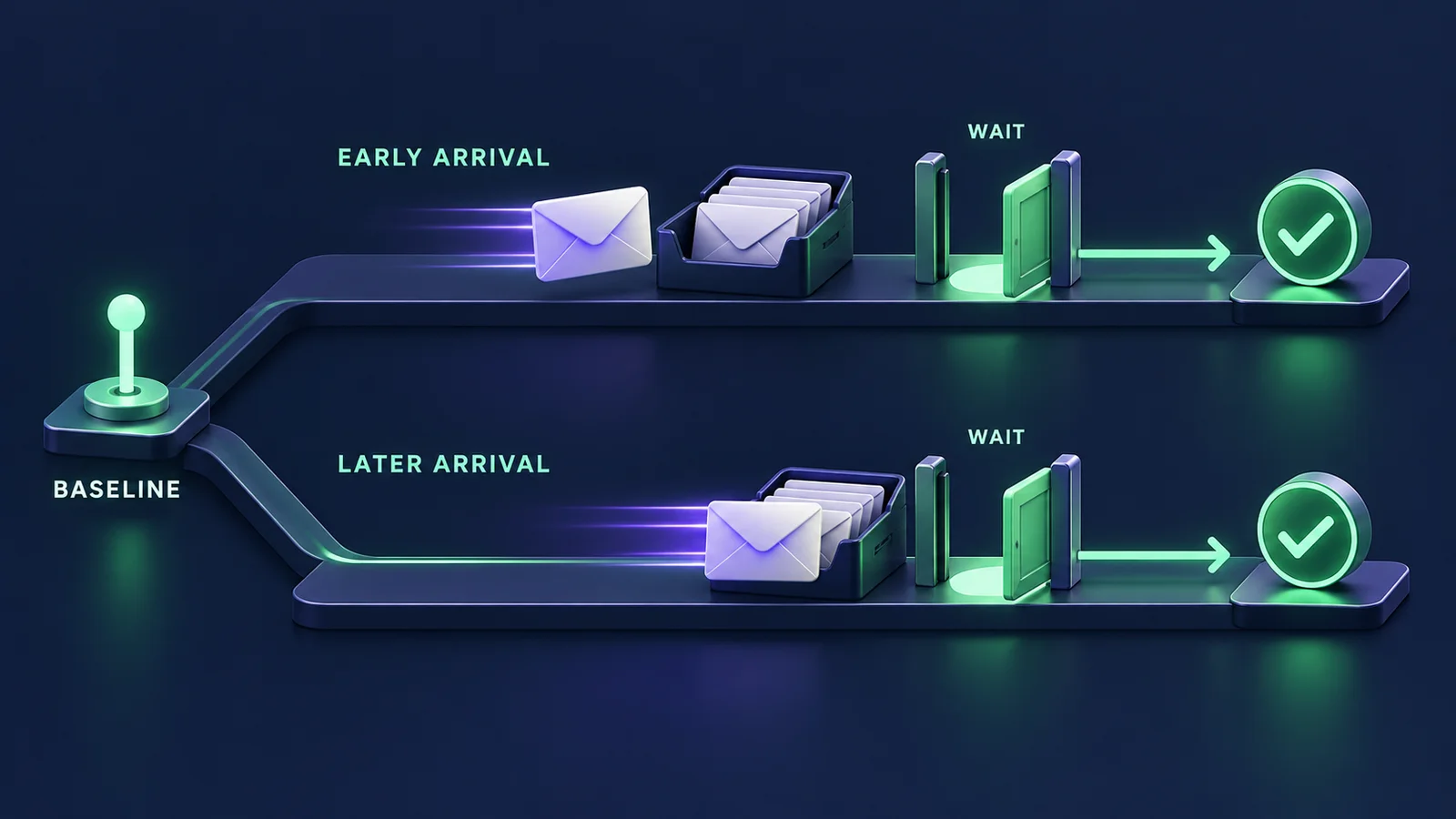
Do not use this zero cursor with an inbox containing earlier runs. For a later send in the same inbox, capture the last observed message ID before triggering that send, then use it as the next after. A resend test also needs rules for identifying which code remains valid.
Give each timeout a clear job
Playwright has separate test and HTTP-request timeouts. Its default test timeout is 30 seconds; its request timeout also defaults to 30 seconds. A server-side 60-second wait needs room in both budgets. See the official Playwright timeout guide and API request options.
- 60 seconds: the requested server-side wait for an eligible message. It can return as soon as the message is available.
- 65 seconds: the HTTP request budget, allowing transport overhead beyond that wait.
- 120 seconds: the test budget for creation, the browser flow, the email request, and verification. Individual browser actions also have limits.
- 900 seconds: the requested inbox TTL, subject to the plan ceiling. It is a fallback for interrupted cleanup.
A fixed sleep always spends its interval before checking. A bounded arrival wait can finish early. The 60-second choice is not a delivery-time guarantee; choose budgets for your staging environment and CI job timeout.
Diagnose the failure without exposing the OTP
The attachment records the phase, inbox and message identifiers, baseline, trigger time, HTTP status, request ID, code count, and whether the subject matched. It omits the API key, inbox credentials, address, message body, actual subject, and OTP.
- Creation fails: inspect the status and project configuration before investigating delivery.
- Normal 204: check the application’s send attempt, recipient, provider response, and mail capture. A timeout alone does not identify which boundary failed.
- Degraded wait: inspect wait concurrency. This does not prove a full 60-second delivery timeout.
- Unexpected subject: inspect which message arrived first. Add a message-selection rule if multiple emails are intentional.
- Zero or multiple codes: examine the template privately. Arrival succeeded; extraction or the expected format needs attention.
- Verification fails: investigate expiry, resend ordering, recipient binding, and the application response.
Keep CI reports private: failed browser actions can include entered values in their error details. Do not publish raw API payloads or recordings containing authentication material. Retrieve a received message through an authorized private workflow when needed.
Keep parallel runs and retries isolated
The inbox is created inside the test, so concurrent workers and retries get separate addresses. There is no global “latest OTP” lookup and no shared mailbox to clear before a run. See what shared inboxes can break in parallel CI for the ownership problem behind this choice.
The finally block attempts deletion on success and failure. It accepts 404 because an expired or already-deleted inbox needs no further cleanup. A cleanup failure annotates the report, preserves the original test error, and makes an otherwise passing run fail. TTL remains a fallback if the process is killed before finally runs.
For several email tests, move this lifecycle into a test-scoped fixture. Reusing an inbox per worker requires an additional freshness and message-selection contract.
Check the journey before adding it to CI
- Replace the selectors and confirm the final heading represents successful verification.
- Check the subject and OTP format against your template.
- Run two tests concurrently and confirm each uses its own address.
- Stop the staging send temporarily and confirm the failure identifies the wait phase.
- Use a staging template without a code and confirm the failure identifies extraction.
- Confirm inbox deletion after a failed assertion and inspect the private attachment.
- Review recording settings and artifact access before enabling the CI job.
Evaluate one real email journey
Start with the signup or login flow whose email boundary you need to exercise. Keep the received code in the browser path, give the test exclusive ownership of its inbox, and make each failure say where the journey stopped.
MailHulk is in preview, with private-beta rollout still being prepared. Use the MailHulk API reference to check the contract, or bring one OTP journey for evaluation.
For the shared setup and a choice of OTP, magic-link, and reset journeys, read the Playwright email-testing guide.